Loading page…
Built for cleaning companies
Keep customer details, recurring bookings, cleaner assignments, messages, and payments connected. Spend less time passing information around and more time running your cleaning business.
Watch the cleaning-company tour
Try the full workflow before committing.
We configure services, team, and settings with you.
Software onboarding and migration are included. Optional phone activation is separate.
Customer management
A house cleaning CRM keeps your leads, customer details, service addresses, conversations, and job history together. ScheduleDrop connects that record to the work itself: quotes, one-time and recurring cleans, cleaner assignments, and payments.
When a customer calls, your office can find the last conversation, check the next booking, and read the notes for that home without piecing the account together from separate apps.
See customer conversations and your business line →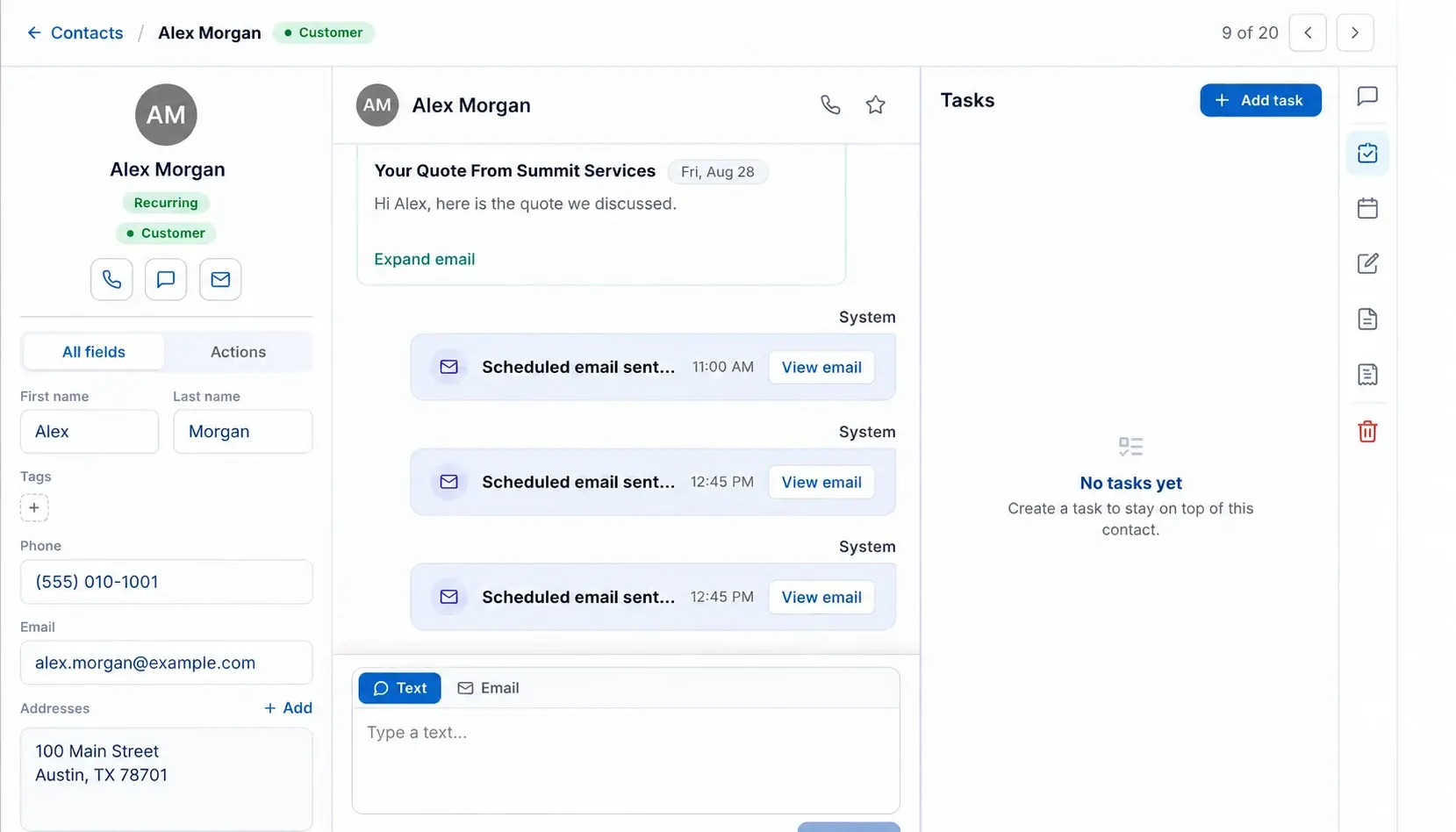
Keep new inquiries and quotes with the contact. People who enter their details in your booking form but leave before booking are saved as leads.
Schedule the weekly or biweekly clean, assign your cleaners, and keep the address and job notes with the booking.
Your office can review the conversation, find a previous job, and help the customer from the same account history.
Moving from MioCommerce? Read our export and migration guide.
Built for cleaning companies
Take the booking, assign your cleaners, send the reminders, and collect payment with the customer history attached.
A branded booking form captures the service, address, and time upfront and drops the job straight onto your calendar — no phone tag, no double entry, no calls missed after hours.
Branded online booking · takes ~30 seconds
Jordan Avery
Friday works. Thank you!
Taylor Brooks
Can you call me?
Casey Morgan
I received the invoice.
Jordan Avery
(555) 010-2384 · jordan@email.com
Reminders send on their own: to customers so they’re ready, and to your cleaners so they show up on time. It’s real two-way texting from your business number, so replies land in one shared inbox instead of someone’s personal phone.
Don’t know where to start on pricing? We set you up with proven cleaning pricing — standard, deep, and move-out cleans — and adjust it to your market with you. Quotes go out in a tap, with a card captured on approval.
New quote from
Sunrise Cleaning
Text message
Your quote is ready — tap to view & approve.
Your quote from Sunrise Cleaning.
Sent by text & email · no app needed
Payment
Job in progress
Card on file · Visa ending 4242
Capture a card on file once, then auto-charge the moment a clean is marked complete. No more cash, checks, or chasing people down — the payment’s in before your cleaner leaves the driveway.
Owner + crew apps
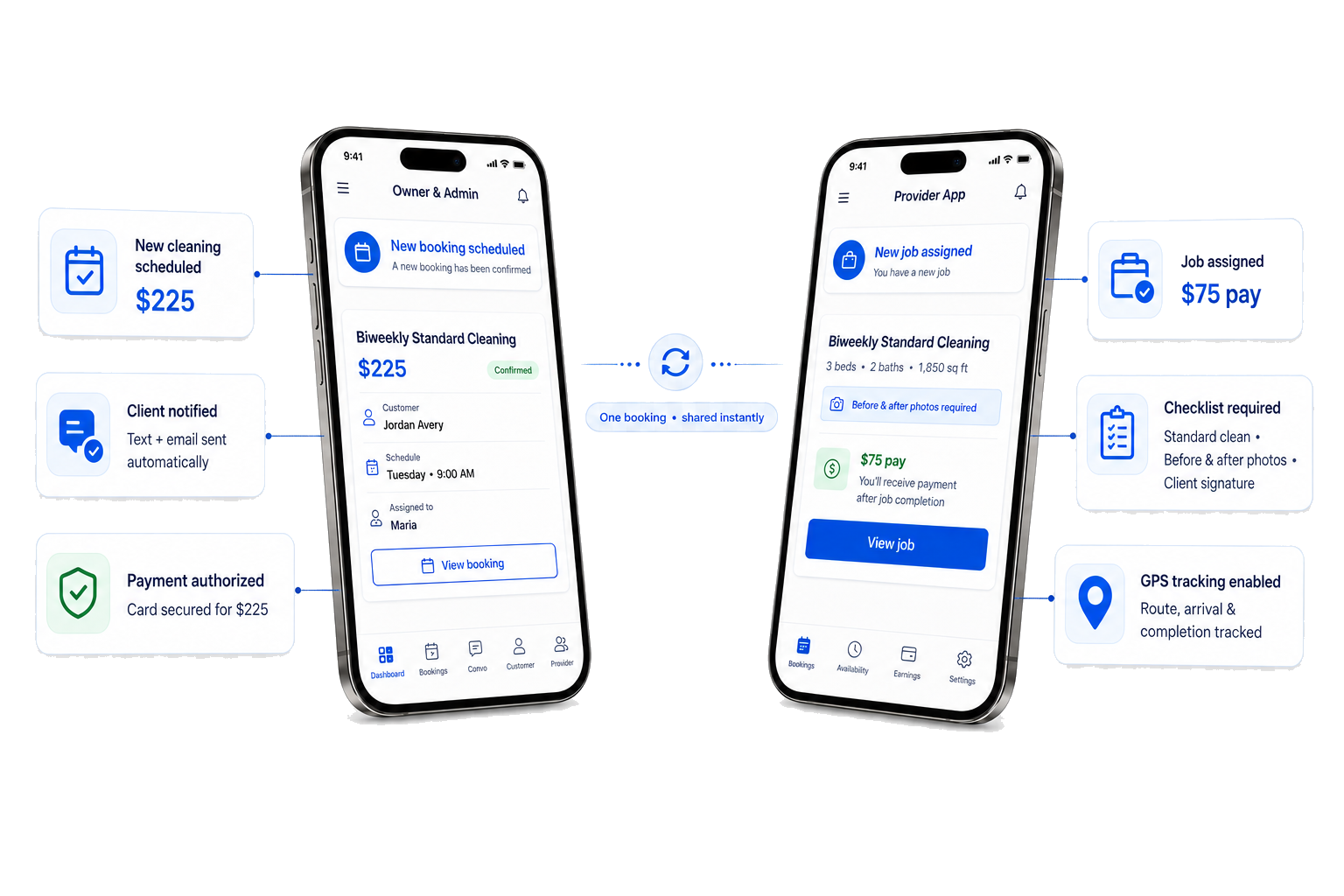
The moment a job books, it lands in both apps at once — the owner sees the payment and the schedule, the cleaner sees the job, the checklist, and where to go.
Book a demo and we’ll walk through booking, scheduling, team communication, and follow-up for a cleaning company like yours.
Real operators, real results
Swipe to see more →
Pricing help
You're not alone — most owners are guessing. Use our free cleaning quote calculator to price standard, deep, and move-out cleans in seconds.
FAQ
A house cleaning CRM is software for managing leads, customers, contact details, service addresses, conversations, and past work. ScheduleDrop connects those records to online booking, recurring cleans, cleaner schedules, quotes, and payments, so customer management and daily operations stay together.
Yes. A contact can have multiple service addresses, internal notes, tags, and conversation history. Keep useful details about a home in the customer record and job notes so your office and assigned cleaners have the information they need.
Yes. Book a one-time clean or set up a recurring schedule, such as every Monday at 10 AM or every other week. Recurring bookings appear up to 12 months ahead, and you can assign individual cleaners or a provider team.
Yes. Customers can reply by text or email, and your team can respond from the shared conversation. ScheduleDrop phone service is billed separately from the software subscription. You can also connect an existing Quo number for automated texts and replies.
Yes. The Owner & Admin app handles bookings, schedules, customer communication, and payments. The Provider app gives cleaners their assigned jobs, addresses, instructions, checklists, and clock-in and clock-out tools.
Yes. We help move customers, recurring bookings, and providers from systems such as BookingKoala, ZenMaid, Jobber, or MioCommerce. During onboarding, we review the data available from your current system and configure services, schedules, and account settings with you.
Software onboarding and migration are included with no software setup fee. Optional ScheduleDrop phone service has separate setup and usage charges. You can review the phone rates on our Texting & Calling feature page before choosing a phone option.
Yes. ScheduleDrop offers a 14-day free trial. We can walk through your booking, recurring cleaning, cleaner assignment, customer communication, and payment workflow before you make the switch. Paid software plans are billed every four weeks, and you can cancel anytime.
A few things owners have shared on X.
 3SDBros@3SDBROS
Starting a new cleaning company means a million questions, and every time I've reached out, their team gets back to me fast.
 José Martínez@joseCleansSTRs
Went from a 4 steps process, to now the client being able to see the photos in their client portal.
 Roberto@robertodjg
Their MCP allowed me to build a @bot that chases customers for a card on file within 24 hours of booking confirmation.
Counts checked Nov 12, 2026. See the original posts for current counts.
Get started
Start your 14-day free trial today. We'll even set it up for you.
Billed every four weeks Setup done for you No software setup fee