
See recurring bookings a full year ahead
Recurring bookings now appear 12 months in advance instead of two, giving you a longer view for staffing and revenue planning.
This update adds a faster date-and-time picker, live provider ETAs, percentage authorization holds, invoice texting, quote analytics, lead capture, and Open API access.
Included in this update
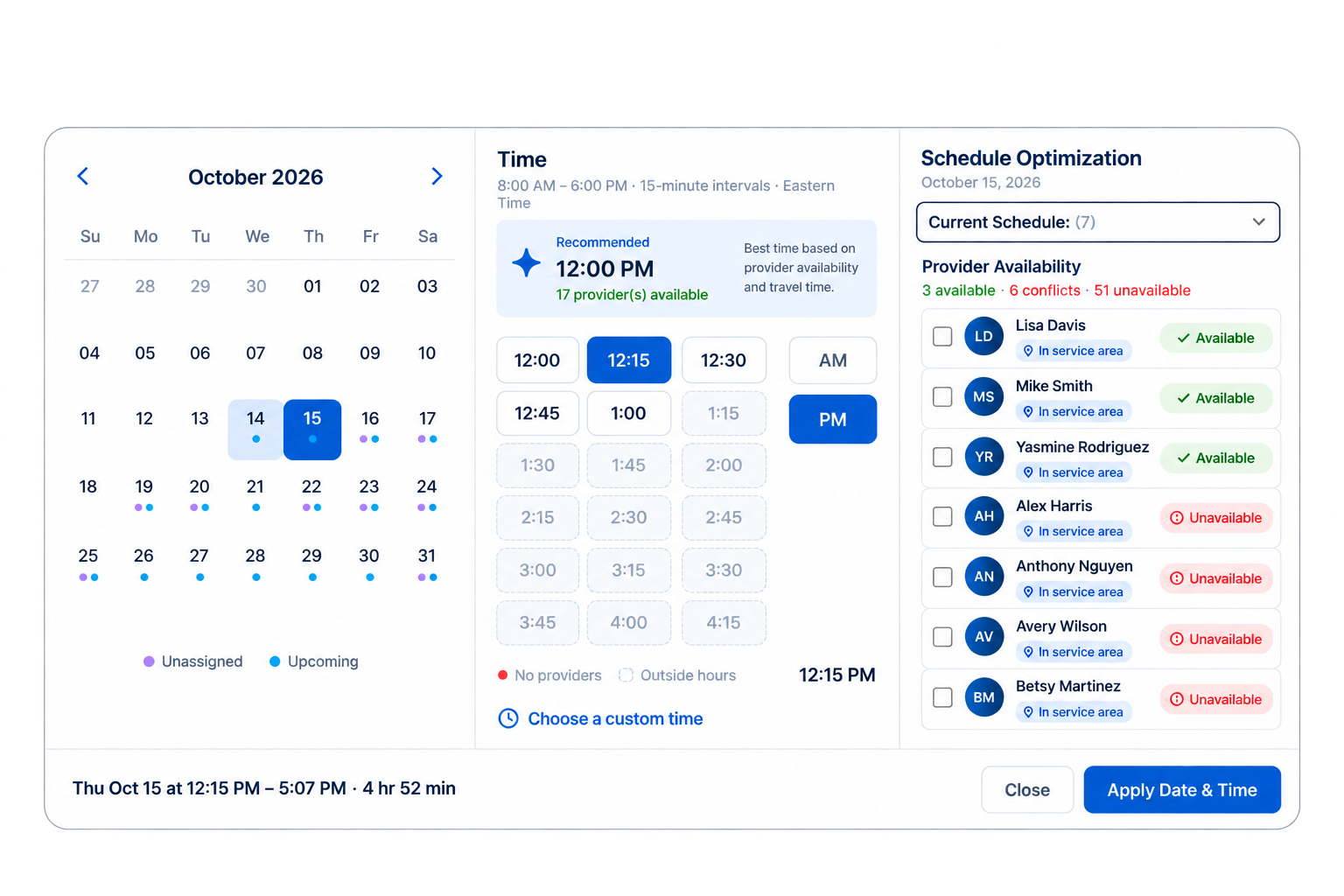
Choose the date, time, and provider from one field.
Send customers an expected arrival time and update it if the provider is running late.
See a full year of recurring work on the schedule.
Hold the percentage you choose instead of the entire booking total.
Send invoices by SMS, copy payment links, and let customers tip online.
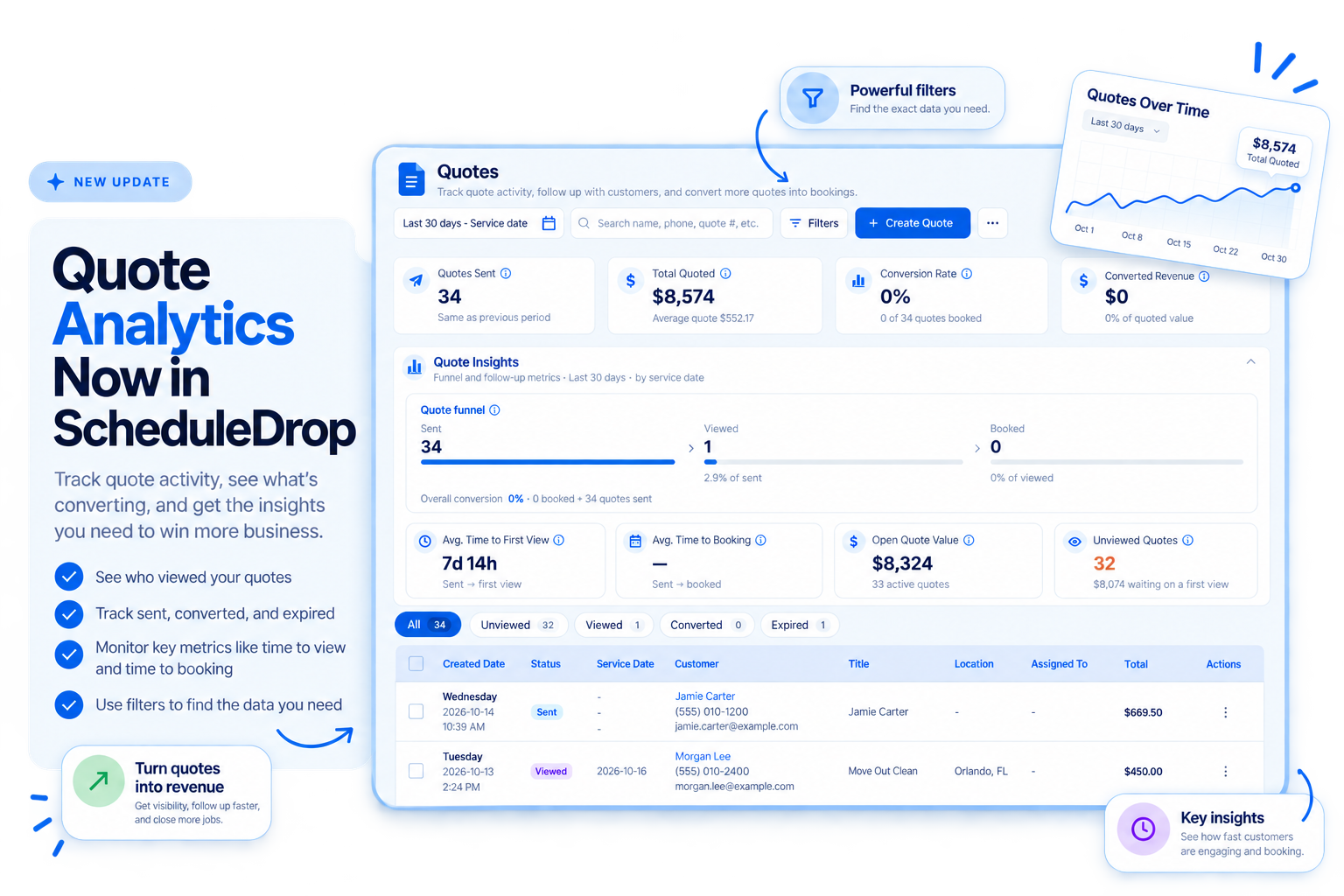
See which quotes were sent, viewed, and turned into bookings.
Save contact details when someone starts booking but leaves before finishing.
Create API credentials and connect ScheduleDrop to your website or other systems.
Booking and scheduling
See the best time for each job, check provider availability instantly, and assign the right provider without digging through multiple schedules.
Date and time now live in one field with a clear time grid, and your online booking form uses the same easier scheduling experience.
Recurring bookings now appear 12 months in advance instead of two, giving you a longer view for staffing and revenue planning.
Change your business hours for one date, such as a holiday closure or early finish, without changing your regular weekly schedule.
Apply a flat-dollar or percentage discount directly to a booking without creating a coupon code first.
Live arrival updates
Providers could already mark themselves On the Way and notify the customer. Now they can include the time they expect to arrive. If they are running late, they can send a new ETA and a reason, and ScheduleDrop automatically updates the customer and admins.
Your team in the field
See each provider’s driving distance to a job site when assigning work.
Add a personal message, cancel an invitation for one provider or the entire blast, and receive a notification when a provider accepts.
Copy an existing provider checklist instead of rebuilding it from scratch.
Payments and invoices
Authorize only part of the booking total before the job, text invoices directly to customers, let customers add tips online, and set better rules for recurring invoices.
Payments
Authorize only a percentage of the booking amount ahead of the job. The remaining amount is charged automatically when the booking is completed.
Assigned providers are notified when a customer leaves a tip and can see their share.
Invoices
Email delivery was already available. This update lets you send the same invoice by text message or copy its payment link directly from the preview.
Customers can add a tip while paying an invoice online.
Set an end date for a recurring invoice and choose the custom days of the week when it should be sent.
Quotes
Quote Insights shows how many quotes were sent, viewed, and converted into bookings. Select a stat card to filter the list and see the quotes behind that result.
Quotes that become bookings remain in your list and are marked as booked, giving you a clearer record of quote activity and conversion over time.
When you resend a quote, you can review a read-only copy of exactly what the customer will receive before it goes out.
Customers, leads, and follow-up
When someone starts booking online, enters their contact information, and leaves your website before finishing, ScheduleDrop saves those details as a lead so your team can follow up.
Lead capture from your booking form
NewThe new Leads tab in Contacts keeps these people together. ScheduleDrop also notifies your team by SMS and email, so you can reach out while the job is still fresh.
01
Contact details entered
02
Saved in Contacts
03
Team notified
Account owners and super admins can see exactly what a customer sees in the portal. Actions taken this way are recorded in the activity log.
Filter contacts by the last time they were sent a quote or had a quote draft created.
Documents
Add a block of text to a document template or package for terms, instructions, or other information recipients need to read but do not need to complete.
Open API
Create API credentials in Settings and use our documentation to connect your website or build custom tools with ScheduleDrop bookings, quotes, and reporting. Share the docs with your developer, or use an AI coding assistant to help plan and build the connection.
Want to connect ScheduleDrop directly to ChatGPT or Claude without building your own integration? Use the ScheduleDrop AI connector.
Questions about any of these updates? Reach out to our support team through the help chat inside your ScheduleDrop account.
Get started
Book a demo to see the new booking picker, payment options, quote tracking, lead capture, and provider arrival tools.
Billed every four weeks Setup done for you No setup fee